
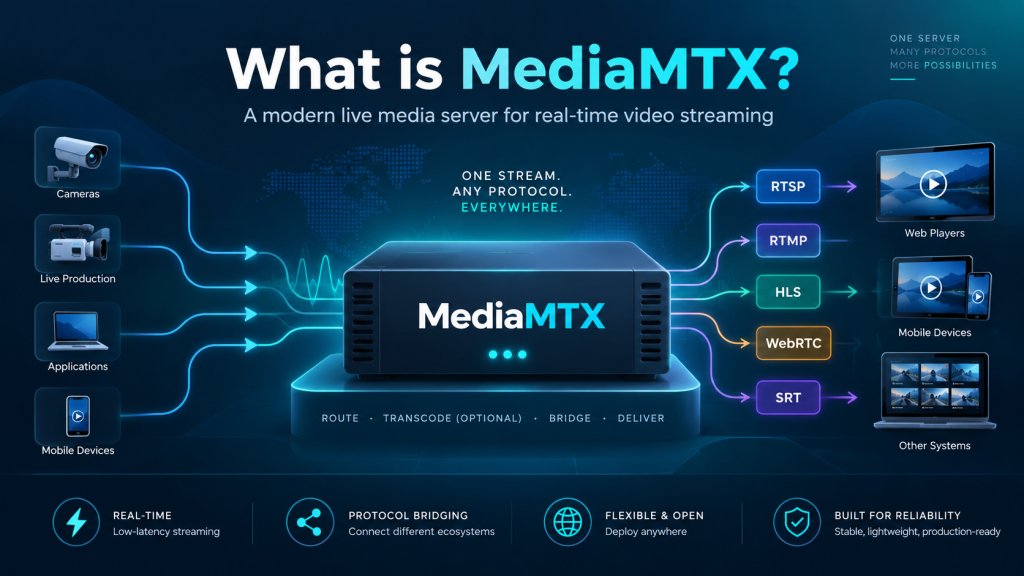
MediaMTX is a useful search term for anyone trying to understand MediaMTX, a modern live media server built for handling real-time video and audio streams. MediaMTX works like a media router: it receives a stream from one source, processes or redirects it, and makes that stream available to viewers or other applications through supported streaming protocols.
For developers, broadcasters, security teams, and streaming enthusiasts, MediaMTX offers a flexible way to manage live media without relying on a heavy software stack. It is designed to be portable, efficient, and easy to deploy across different environments for projects of different sizes today.
Understanding MediaMTX in Simple Terms
MediaMTX is an open-source live media server and media proxy. Its purpose is to publish, read, proxy, record, forward, and play back real-time video and audio streams. Instead of forcing users to work with a single streaming technology, it can connect different protocols and clients within the same system.
This makes MediaMTX useful when a camera, encoder, browser, or broadcasting tool sends media in one format while viewers or applications need to receive it through another. The server handles this routing process, reducing the need to build separate streaming infrastructure for every protocol.
How MediaMTX Handles Live Streams
The workflow is straightforward. A video source first publishes a stream to the MediaMTX server. That source may be OBS Studio, FFmpeg, GStreamer, a web browser, a Raspberry Pi camera, or another compatible client. MediaMTX then makes the stream available through one or more supported output methods.
A major advantage is protocol conversion. For example, a stream entering through RTSP can be made available through HLS or WebRTC when codecs and configuration are compatible. This helps developers create systems that serve different devices and applications without duplicating the original stream.
Streaming Protocols Supported by MediaMTX
MediaMTX supports several technologies used in professional and web-based streaming. These include RTSP, RTMP, HLS, Low-Latency HLS, WebRTC, SRT, MPEG-TS, RTP, and Media over QUIC. Support for multiple protocols allows the server to work across many streaming environments.
RTSP is commonly used with IP cameras and surveillance systems, while RTMP is popular for publishing streams from broadcasting software. HLS is useful for browser delivery, WebRTC supports very low-latency communication, and SRT is useful for reliable streaming over unpredictable networks.
Features That Make MediaMTX Useful
MediaMTX offers more than basic stream delivery. It can serve multiple streams on separate paths, record streams to disk, play recordings back, forward media to other servers, and proxy remote streams. It also supports configuration reloading without disconnecting active clients, which can simplify maintenance.
For access control, MediaMTX supports internal credentials, HTTP-based authentication, and JWT-based authentication. Administrators can also use a control API and collect Prometheus-compatible metrics, which helps when the server operates inside a monitored production environment.
Why Developers and Streamers Choose It
One reason MediaMTX attracts developers is its simple deployment model. It is designed as a ready-to-use, zero-dependency application, which can reduce setup complexity compared with systems requiring multiple services. Its portability makes it suitable for local computers, servers, containers, edge devices, and cloud environments.
Streamers can benefit from compatibility with familiar tools. OBS Studio can publish streams, VLC can read supported outputs, and FFmpeg or GStreamer can support advanced workflows. This flexibility allows teams to start with small prototypes and expand into more structured streaming platforms.
Common Real-World Applications
MediaMTX can be used for live broadcasting, IP camera distribution, remote monitoring, video production, embedded devices, internal company streams, and low-latency browser viewing. A security system, for example, can ingest RTSP feeds from cameras and make selected feeds available through another protocol to authorized users.
It can also bridge old and new streaming technologies. Organizations with existing RTSP or RTMP sources can expose those streams to modern browser-based applications without replacing all of their original hardware or software.
Is MediaMTX Difficult to Set Up?
The basic setup is approachable for users who understand networking and streaming concepts. MediaMTX provides a configuration file where administrators can control server behavior, authentication, recording, protocols, paths, and other options. Simple use cases may need only minimal changes, while advanced deployments can be customized further.
Successful configuration still depends on network conditions, ports, firewalls, codecs, NAT traversal, and the selected streaming protocol. WebRTC deployments, in particular, may require extra networking attention when clients connect from outside a local network.
Conclusion
MediaMTX can be a valuable keyword for users researching a practical way to route, publish, receive, record, and manage live audio or video streams. MediaMTX combines support for multiple streaming protocols with authentication, recording, forwarding, metrics, and API-based control, making it useful for experiments and production-oriented workflows.
For developers, broadcasters, camera-system builders, and businesses, the biggest benefit is flexibility. Instead of creating a separate server for every delivery method, MediaMTX can sit at the center of a streaming architecture and connect different sources, clients, and protocols through one manageable media-routing platform.